

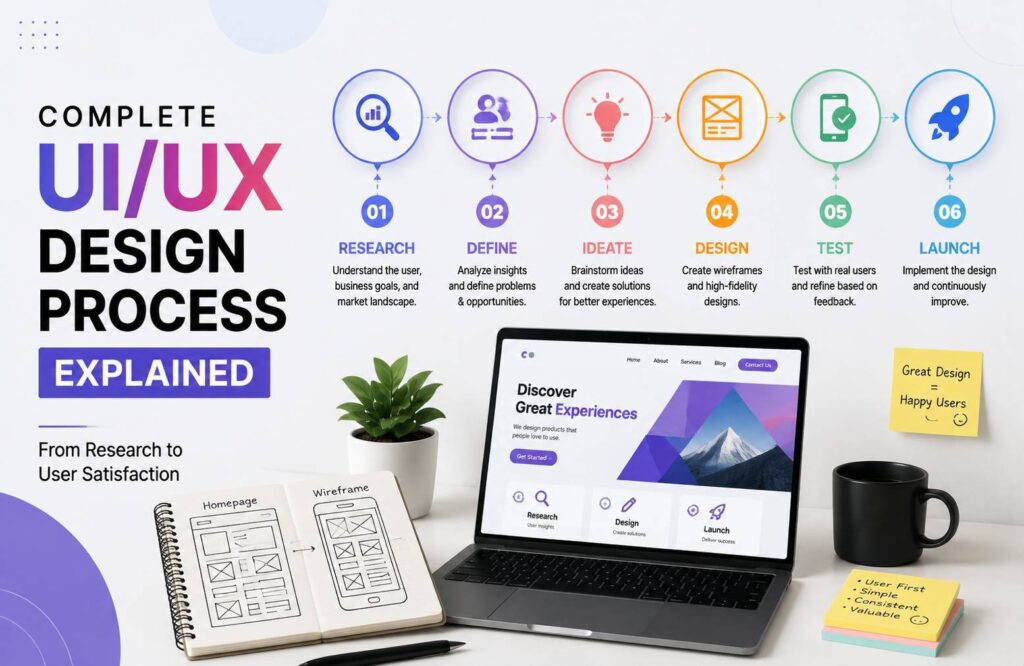
The UI/UX design process is the foundation of creating digital products that are attractive, easy to use, and useful. Whether you’re designing a website, mobile app, or software platform, a well-planned process helps turn an idea into a smooth user experience. Good UI/UX isn’t simply about making screens look beautiful-it is about understanding users, solving problems, and creating interfaces that feel natural.
A successful design process usually includes research, planning, wireframing, visual design, prototyping, testing, and continuous improvement. Let’s explore each stage in detail.
1. Understand the Project Requirements
Every successful design starts with a clear understanding of the project.
Before opening a design tool, designers need to understand what the product is supposed to achieve. This includes identifying the business goals, target audience, important features, competitors, and potential challenges.
For example, an e-commerce website may focus on increasing product sales, while a banking application may prioritize security and simple navigation.
At this stage, designers communicate with clients, stakeholders, developers, and other team members to collect important information.
A clear project brief can prevent confusion later and gives the design team a strong direction.
2. Conduct UX Research
Research is one of the most important parts of user experience design. Designers need to understand who will use the product and what those users actually need.
UX research can include surveys, interviews, competitor analysis, user observations, and reviewing existing website or app data.
The goal is not to make assumptions about users. Instead, designers gather evidence that helps them make better decisions.
For example, if users frequently struggle to find a website’s contact information, the design should make that information easier to discover.
Good research creates a strong foundation for every stage that follows.
3. Create User Personas
After collecting research, designers can create user personas.
A persona is a fictional representation of an ideal user based on real research and customer information. It can include details such as age range, goals, frustrations, behavior, and technical knowledge.
Personas help design teams stay focused on the people who will actually use the product.
Instead of asking, “Does this design look good?” designers can ask, “Will this design help our target user complete their goal?”
That small change in thinking can have a major impact on the final product.
4. Plan the User Journey
The next step is understanding how users will move through the product.
Designers create user flows to visualize the steps a person takes to complete a specific task. For example, an online shopping flow might look like:
Homepage → Product Page → Add to Cart → Checkout → Payment → Confirmation
Mapping these steps helps identify unnecessary screens, confusing navigation, or potential problems.
A simple user flow can make the entire experience more logical before visual design begins.
5. Create Wireframes
Once the structure is clear, designers begin creating wireframes.
Wireframes are simple layouts that show where important elements will appear on a page or screen. They usually focus on structure rather than colors, images, or decorative elements.
A wireframe might show the location of:
- Navigation menus
- Headings
- Buttons
- Images
- Forms
- Content sections
- Calls to action
Wireframing allows designers to experiment quickly without spending too much time on visual details.
It is much easier to move a button in a wireframe than to redesign an entire finished interface.
6. Develop the Visual Design
After the basic structure is approved, designers move into user interface design.
This is where the product begins to develop its visual identity. Designers select colors, typography, icons, images, spacing, buttons, and other interface elements.
The goal is to create a design that looks professional while remaining easy to understand.
Consistency is especially important. Buttons should behave and look similar throughout the product, typography should follow a clear hierarchy, and spacing should feel balanced.
A strong visual design supports usability instead of distracting users from their goals.
7. Build an Interactive Prototype
A prototype connects individual screens and makes the design feel more like a real product.
Users can click buttons, navigate between screens, open menus, and experience important interactions.
Prototypes are useful because they allow designers, clients, and developers to experience the product before development begins.
They can also reveal problems that may not be obvious when looking at static designs.
For example, a navigation system may look perfectly fine on individual screens but feel confusing when users actually move through it.
8. Perform Usability Testing
Usability testing helps determine whether real users can understand and use the product easily.
During testing, selected users are asked to complete specific tasks while designers observe their behavior. Designers look for problems such as confusing buttons, unclear instructions, difficult navigation, or unnecessary steps.
The goal is not to prove that the design is perfect. Instead, testing helps identify weaknesses before they become expensive development problems.
Even testing with a small number of relevant users can provide valuable insights.
9. Improve the Design
UI/UX design is rarely a one-time process. After testing, designers review the feedback and make improvements.
Some changes may be small, such as adjusting button labels or spacing. Others may involve larger changes to navigation or page structure.
Designers may repeat the testing and improvement cycle several times until the experience becomes more efficient and intuitive.
This iterative approach helps create products based on actual user behavior rather than personal opinions.
10. Handoff and Development
Once the design is ready, the project moves toward development.
Designers provide developers with the necessary design files, specifications, assets, component details, and interaction guidelines.
A good handoff is important because even a great design can lose quality during implementation if developers do not have clear information.
Designers and developers should communicate throughout this stage to ensure the final product matches the intended experience.
11. Launch, Analyze, and Improve
The UI/UX design process doesn’t necessarily end when the product launches.
After launch, teams can analyze user behavior through analytics, feedback, reviews, support requests, and other data.
This information can reveal new problems and opportunities for improvement.
Successful digital products continue evolving as user expectations, technology, and business goals change.
Conclusion
The complete UI/UX design process combines research, strategy, structure, visual design, prototyping, testing, and continuous improvement. Each stage plays an important role in creating digital experiences that are both attractive and functional.
The best designs aren’t created simply by choosing beautiful colors or modern layouts. They come from understanding users and solving real problems.
By following a structured process, designers can reduce usability issues, improve customer satisfaction, and create websites and applications that people genuinely enjoy using.